I've been building an iOS app called VeloGPS — a real-time GPS dashboard for sailing, hiking, biking and outdoor use. It shows your coordinates, speed, altitude, heading, barometric pressure, and more, all in a clean native interface. No accounts, no analytics, no third-party code. Everything stays on your device.
The entire app was built using Claude Code, and I wanted to share how the project came together, the technology choices behind it, and where it stands today.
The Idea
I wanted a GPS app that did one thing well: show me precise position data while I ride. Most GPS apps are bloated with social features, subscription paywalls, or cloud sync I don't need. I wanted something fast, private, and focused — a tool, not a platform.
The goal was straightforward: real-time GPS data on a single screen, with track recording, waypoints, and charts for reviewing a ride. No server, no sign-up, just the sensors on your phone.
The Stack
VeloGPS is built entirely with Apple's native frameworks. Zero third-party dependencies:
- SwiftUI — all UI, targeting iOS 18+
- SwiftData — local persistence for waypoints, tracks, and settings
- MapKit — interactive map with multiple styles
- CoreLocation — GPS position, speed, altitude, course, and compass heading
- CoreMotion — barometric pressure and relative altitude
- ActivityKit — Live Activities on the Lock Screen and Dynamic Island
- Swift Charts — real-time speed, altitude, and pressure graphs
- WidgetKit — the Live Activity extension
The project uses XcodeGen to generate the Xcode project from a YAML file, which keeps the project configuration clean and diffable. Swift 6 with strict concurrency checking enabled — no shortcuts on thread safety.
How It Works
The app has four tabs: Map, Info, Waypoints, and Tracks.
Map Tab
The Map tab is the primary view. It shows your position on an interactive map with a data panel along the bottom displaying coordinates, speed, altitude, course, heading, and barometric pressure.
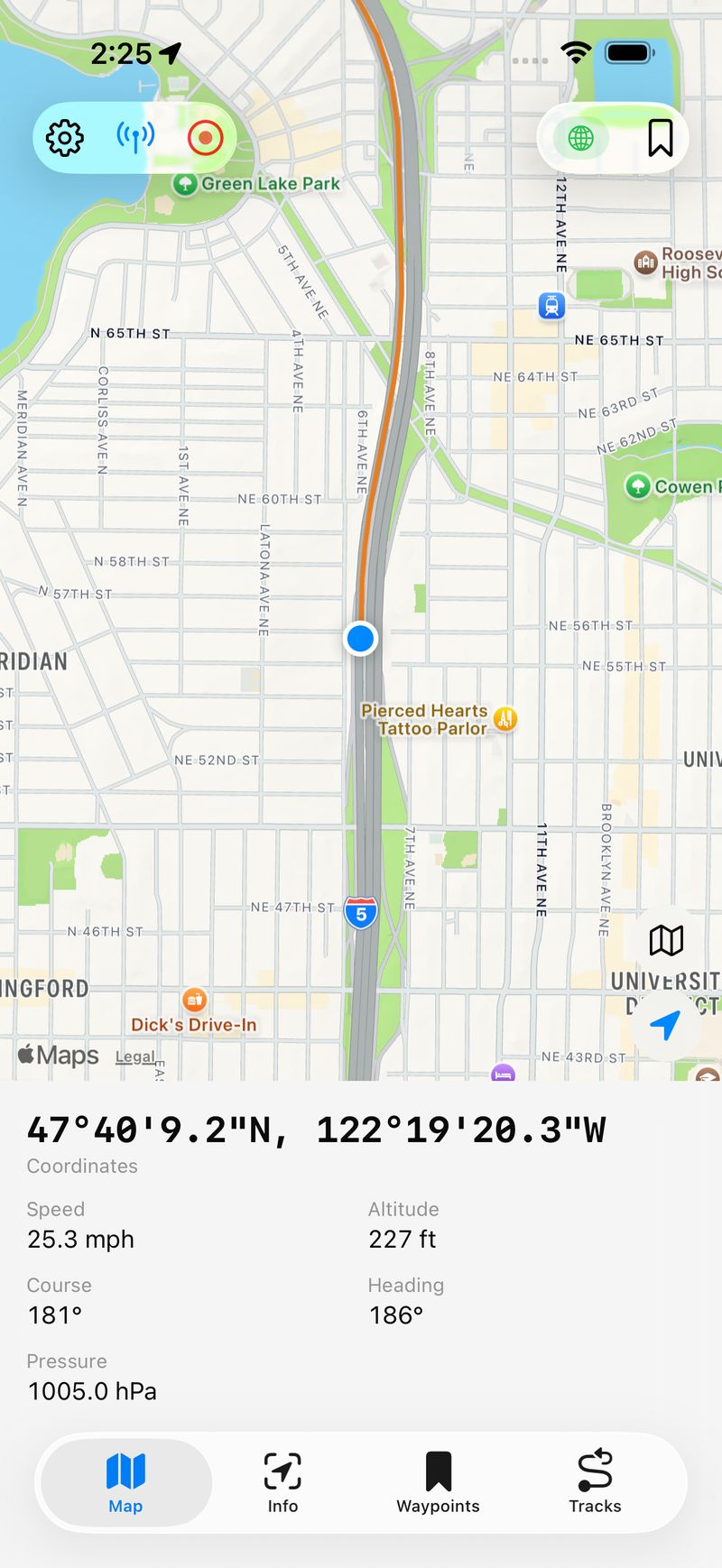
The Map tab with live GPS data — coordinates in DMS format, speed, altitude, course, heading, and barometric pressure all visible at a glance.
You can switch between Standard, Hybrid, and Satellite map styles. A tracking mode button toggles between following your position and free panning. When you're recording a track, it draws as a colored polyline on the map in real time.
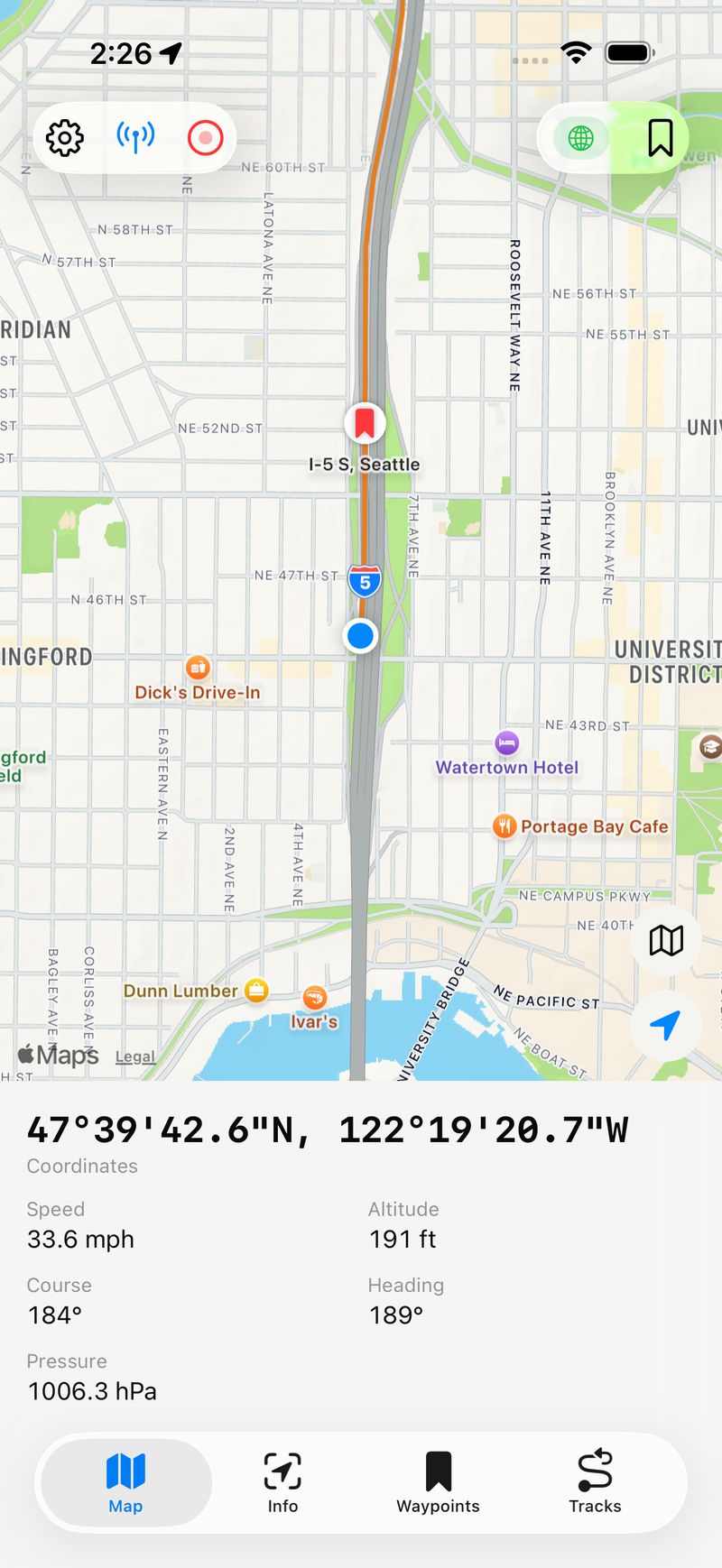
A recorded track with waypoint pins on the map. The blue dot shows current position, red pins mark saved waypoints.
Info Tab
The Info tab gives you the full data dashboard — all your current readings, session statistics, and real-time charts in a scrollable view. Session stats include distance, elevation gain and loss, max speed, average moving speed, and current grade.
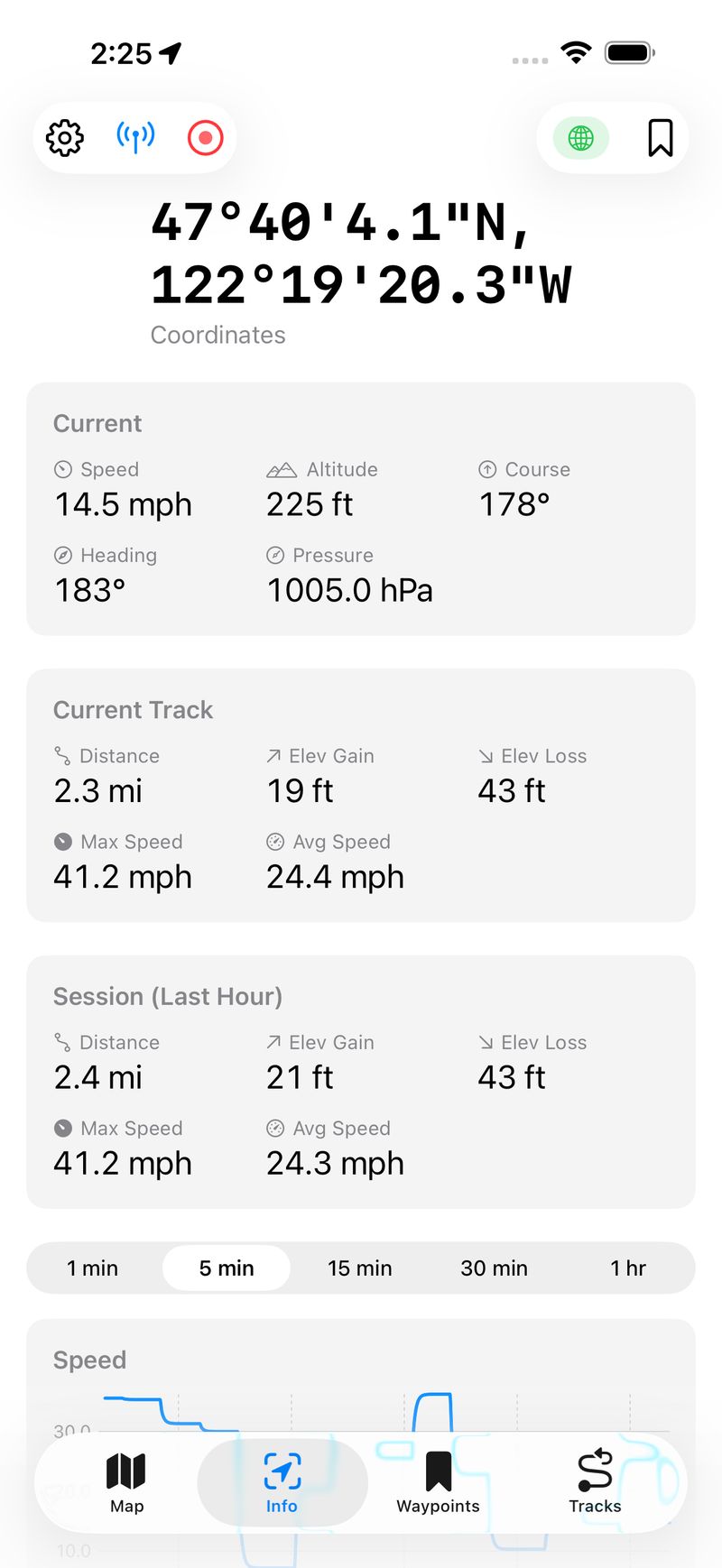
Current readings, track statistics, and session stats all in one scrollable view. Track stats show the current recording; session stats cover the last hour.
Charts
Below the stats, real-time charts show speed, altitude, and barometric pressure over configurable time windows from one minute to one hour. The charts use EMA smoothing for clean, readable lines. A GPS Activity chart shows location update frequency — useful for diagnosing reception quality.
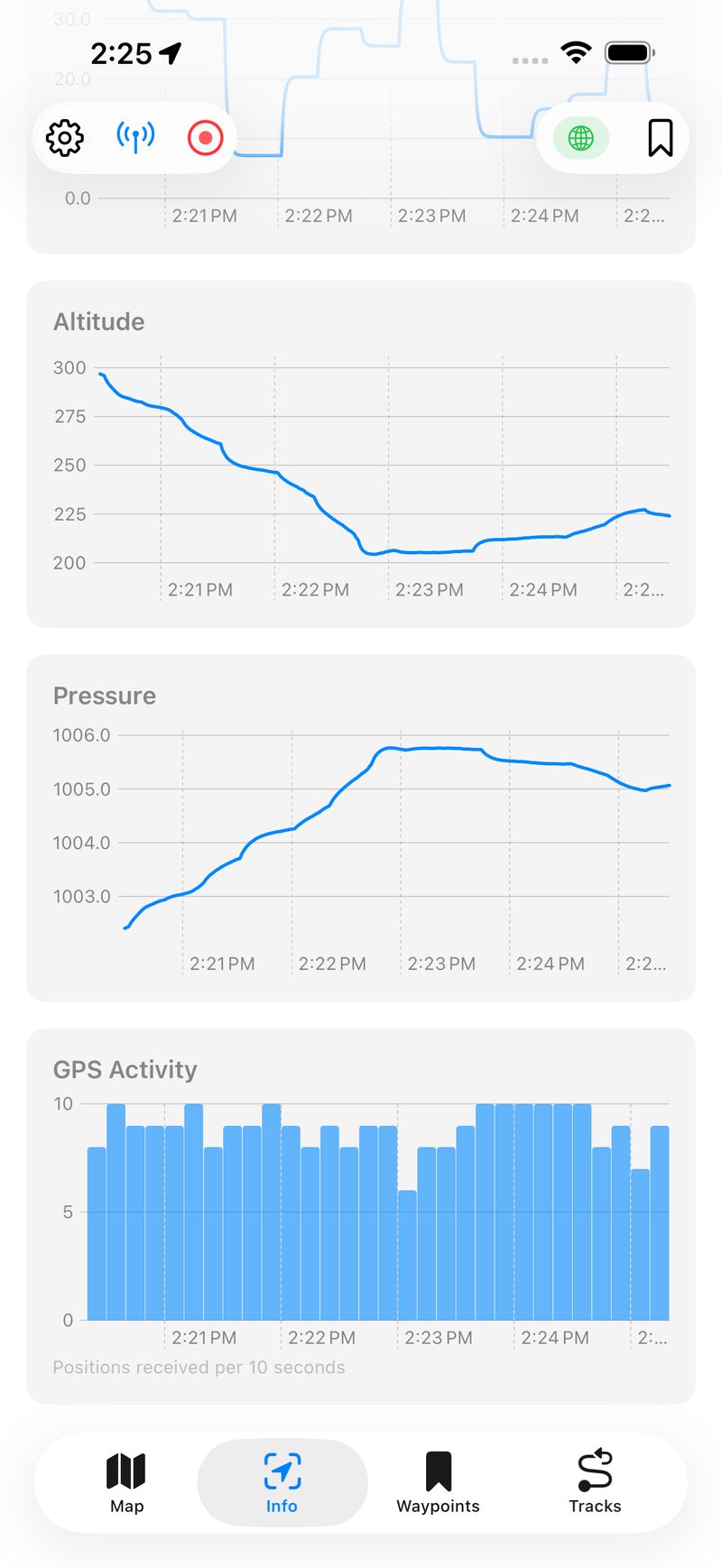
Altitude, pressure, and GPS activity charts. The altitude chart clearly shows a descent. The GPS Activity bar chart shows consistent ~10 updates per second.
Track Recording and Management
Tap the record button to start capturing a GPS track. Tap again to stop and save. The app computes running statistics as you ride — distance, elevation gain and loss, max speed, and average moving speed. Saved tracks can be renamed, assigned one of ten colors, toggled on and off on the map, and exported as standard GPX files.
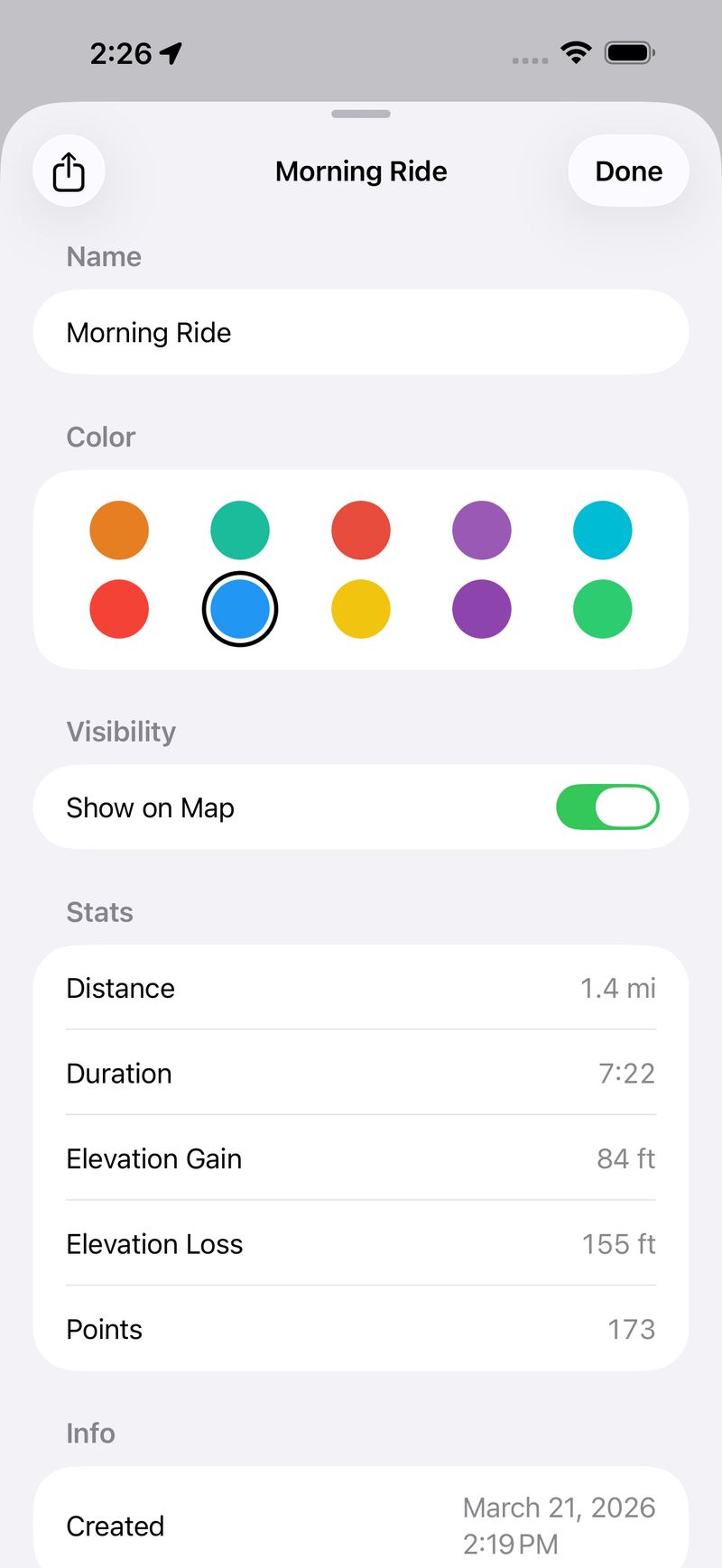
Track detail with distance, duration, elevation stats, point count, color picker, and map visibility toggle. Tracks export as GPX via the share button.
Live Activity
One of my favorite features. Start a Live Activity and your speed, coordinates, altitude, and distance stay on your Lock Screen and in the Dynamic Island — even when the app is in the background. It's genuinely useful on a bike where you don't want to unlock your phone to check speed.
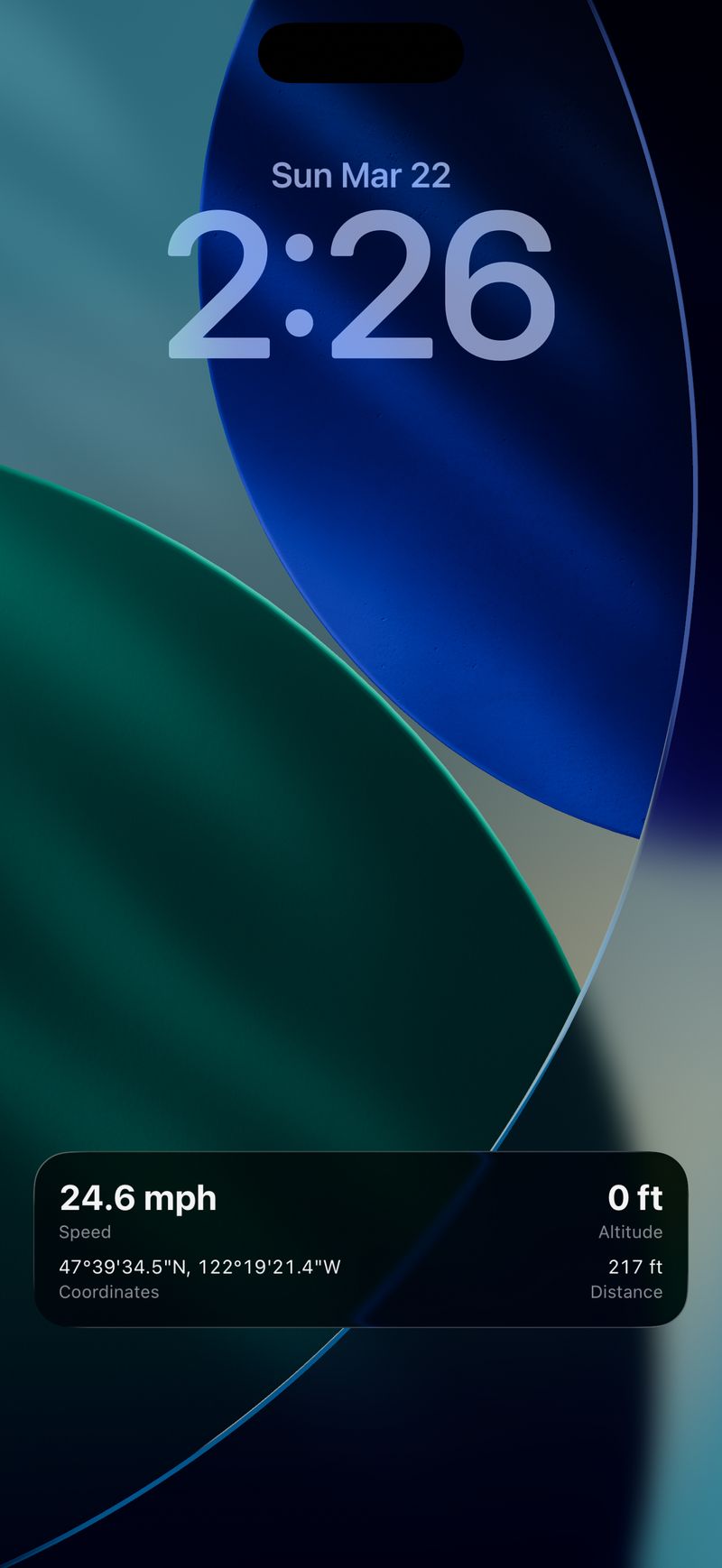
The Live Activity on the Lock Screen showing speed, altitude, coordinates, and distance at a glance.
Architecture
The app follows an MVVM-light pattern with @Observable. All ViewModels and Services are @Observable @MainActor, which plays nicely with Swift 6's strict concurrency model.
Services are injected through SwiftUI's environment system rather than being passed as parameters through every view. A LocationProviding protocol abstracts the GPS source, which makes it easy to swap in a mock for testing or a preview service for SwiftUI previews.
An AppCoordinator handles cross-service orchestration — things like feeding location updates to the track recorder, throttling Live Activity updates, and managing location services across scene phase transitions. This keeps the services themselves focused on single responsibilities.
One pattern I'm happy with is PositionShell — a shared wrapper view that both the Map and Info tabs use. It handles the toolbar (settings, Live Activity toggle, track recording, GPS quality indicator, waypoint save), toast notifications, and modal sheets. This eliminated about 150 lines of duplicated code between the two tabs.
Building with Claude Code
This project was built entirely through conversation with Claude Code. The workflow was iterative: describe what I want, review the implementation, adjust, and move on.
A few things that worked particularly well:
Strict concurrency from the start. Swift 6's strict concurrency checking catches real bugs, but it's notoriously difficult to retrofit onto an existing codebase. Building with it enabled from day one meant every new piece of code was thread-safe by construction.
Test coverage. The project has 192 unit tests across 23 suites using Apple's Swift Testing framework, plus a comprehensive XCUITest suite covering navigation, waypoint management, settings, map interactions, and end-to-end workflows. Claude Code wrote the tests alongside the features.
Incremental feature development. Features were added one at a time — first the basic map and GPS display, then waypoints, then track recording, then charts, then Live Activities, then power saver mode, then GPX export. Each feature built on the previous foundation without requiring major rewrites.
Automated screenshot capture. The App Store screenshots and preview video are captured by a shell script that drives XCUITests and the AXe CLI tool for simulator automation. This means I can regenerate all marketing assets with a single command after any UI changes.
What's in the App Today
Here's a summary of where VeloGPS stands:
- Real-time GPS dashboard — coordinates (DD, DMS, UTM), speed, altitude, course, compass heading, barometric pressure
- Interactive map — Standard, Hybrid, and Satellite styles with tracking mode toggle
- Track recording — capture GPS tracks, view stats, choose colors, toggle map visibility, export as GPX
- Live Activity — speed, coordinates, altitude, and distance on the Lock Screen and Dynamic Island
- Real-time charts — speed, altitude, pressure, and GPS activity with configurable time windows
- Session statistics — distance, elevation gain/loss, max speed, average moving speed, grade
- Waypoints — save locations, view distance from current position, tap map pins for details
- GPS quality indicator — color-coded toolbar icon with detailed accuracy sheet
- Power Saver mode — reduces GPS frequency and pauses sensors for longer battery life
- Flexible units — coordinates, speed, distance, and pressure each have multiple unit options
- iPad support — sidebar navigation on iPad, tabbed on iPhone, adapts to split-screen
- Fully private — no accounts, no analytics, no network calls, no third-party code
What I Learned
Native frameworks are enough. SwiftUI, MapKit, CoreLocation, SwiftData, Charts, ActivityKit — Apple provides everything you need for an app like this. No CocoaPods, no SPM dependencies, no version conflicts. The app binary is small and the attack surface is zero.
Swift 6 concurrency is worth the pain. Strict concurrency checking caught several real race conditions during development that would have been subtle bugs in production. The @MainActor annotations feel verbose at first, but they make the threading model explicit and verifiable.
Live Activities are underutilized. Most apps use Live Activities for delivery tracking or sports scores. For a GPS app, having speed and coordinates on the Lock Screen is a killer feature. The implementation wasn't trivial — ActivityKit has quirks around stale activity teardown and background location authorization — but the result is worth it.
AI-assisted development scales. VeloGPS is a real app with real complexity — multiple services, cross-service coordination, background processing, widget extensions, comprehensive tests. Building it conversationally with Claude Code didn't mean cutting corners. It meant spending my time on decisions and design rather than boilerplate.
The app is available on the App Store. If you're into cycling or just want a clean GPS tool, give it a try.